اینها همون سه دستور ریل «Claude هر چیزی رو با یه سبک معروف توضیح میده» توی اینستاگرام بلنک پیکسلان. اونجا دیدی چای چطوری خواب رو از سرت میپرونه، چرا بعضی جاهای تهران دارن فرو میرن و چرا نقشهی دنیا گرینلند رو اینقدر بزرگ نشون میده. اینجا پرامپت هر سه رو داری تا سؤال خودت رو باهاشون توضیح بدی.
روش استفاده
سؤالت رو توی کادر «صحنهی خودت» بنویس، یا یکی از نمونهها رو بزن. فارسی بپرسی، متنهای روی ویدیو هم فارسی میشه.
زیر سبکی که میخوای، «کپی پرامپت کامل» رو بزن. پرامپت پایه، سؤال تو و اون سبک با هم کپی میشن.
توی Claude بچسبون و بفرست. Claude یه فایل HTML میسازه که همونجا توی چت (Artifact) پخش میشه.
- برای اینکه توی Claude Code دستور بشه: کادر سؤال رو خالی بذار، پرامپت کامل یه سبک رو کپی کن و توی پوشهی پروژهات، در فایل .claude/commands/flat-science.md بذار. بعد توی فایل جای [SCENE] بنویس $ARGUMENTS. از اون به بعد کافیه بنویسی /flat-science و سؤالت رو. دو سبک دیگه هم همینطور، هر کدوم با اسم خودش.
- برای ویدیو، انیمیشن رو تمامصفحه کن و صفحه رو ضبط کن؛ یا توی Claude Code بگو همین رو با Remotion به MP4 تبدیل کنه.
- عددی که توی ویدیو میاد رو یه بار خودت هم چک کن. پرامپت از Claude میخواد فقط عددهای شناختهشده و منبعدار بیاره و منبعش رو زیرش بنویسه، ولی چک آخر با توئه.
صحنهی خودت
فارسی هم بنویسی Claude میفهمه. خالی بمونه، جاش توی پرامپت [SCENE] میمونه و بعداً پرش میکنی.
یا یکی از اینها:
پرامپت پایه
همهی دکمههای کپی پایین، همین پرامپت رو با صحنهی تو و اون سبک کامل میکنن. اینجا فقط برای اینه که ببینی توش چیه.
Make a short animated explainer video as ONE self-contained HTML file (inline SVG and/or <canvas> with vanilla JS; no external libraries, no image files). Show it as an artifact so it plays right away.

Question: [SCENE]

First answer the question for yourself in three simple, correct steps and one short payoff line. Keep every fact true; simplify, never bend it. Show a number only if it is well known and sourced, and put the source in small type under the payoff. Write every word on screen in the language of the question.

Frame: 1080×1920 portrait, scaled to fit the window. About 8 seconds, then it loops seamlessly.
Layout (keep it: it is what makes it read on a phone):
- Top: the question as the title, big (about 68px), with its key word on a solid blue chip (#006fc2, white text).
- Middle: one full-bleed scene that shows the answer happening, not a diagram covered in text. The subject is big and fills the middle of the frame.
- Labels: one short label per step (one or two words, at least 44px) on a small white card, with a thin line to the exact part it names. They appear one at a time, about 1.6 seconds apart; the newest card is blue. Never put a label on top of the subject: place it in empty space and point.
- Bottom: one caption line at a time (at least 48px), the step's sentence, coming in with its label. The last caption is the payoff, a little bigger, with its key words on the blue chip; the labels leave when it comes.
- Lower third, bottom centre: a small white pill with the command name on the left and "made by Claude" (in the question's language) on the right, and a thin blue progress line along its bottom edge.
Motion: nothing ever sits still. The scene acts out each step as its label appears (things move, fill, dock, drain, sink, slide), with ease-in-out curves.

Style: [STYLE]

Before you finish, check one frame at phone size: can every label be read, is nothing covering the subject, and would someone recognise the style at a glance? Fix whatever fails.۳ سبک
تصویر هر سبک یه فریم از ریل خودمونه. نتیجهی تو با سؤال خودت فرق میکنه و هر بار هم کمی فرق داره.
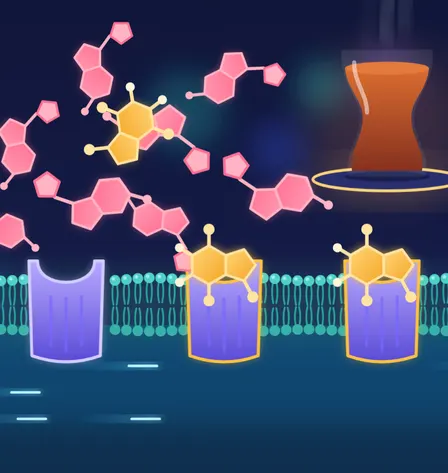
سبک ۱: علمی، فلت و درخشان
شکلهای تخت و نورانی روی سرمهای
Command name: /flat-science. A flat, glowing science explainer like the popular animated science channels: a deep navy-indigo background (#0d1330) with soft out-of-focus glowing circles drifting; every object a clean flat vector shape with no outlines, a soft inner gradient and a gentle outer glow; a small saturated palette (coral #ff6f91, amber #ffbf3f, teal #4fd1c5, lavender #9d8cff), one colour per kind of thing; the microscopic made big and readable (molecules as chunky rounded shapes, cells as soft bands); smooth floating motion, and things pop in with a small overshoot. Light text.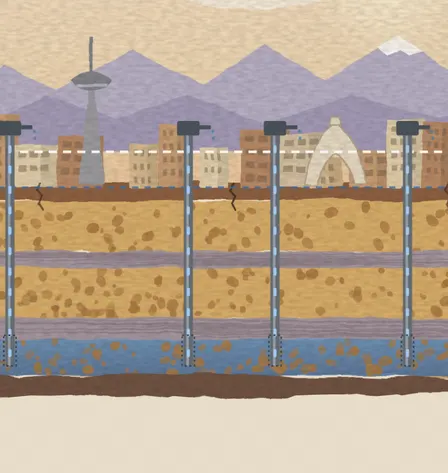
سبک ۲: قصه با نقاشی دستی
گواش روی کاغذ، مثل کتاب مصور
Command name: /painted-story. A hand-painted story in gouache, like a picture book: warm paper (#efe5d2) with a visible grain; flat opaque colour areas with slightly wobbly, brushy edges (SVG feTurbulence into feDisplacementMap) and a soft mottled texture inside each fill; a warm, limited palette (cream sky, ochre, terracotta, sienna, slate, one clear blue for water); a storybook composition such as a cross-section, what we see on top and what happens underneath; repaint the texture a few times a second (change the noise seed every 4 frames) so it feels hand-made; a dashed white pencil line marks where things used to be. Dark text.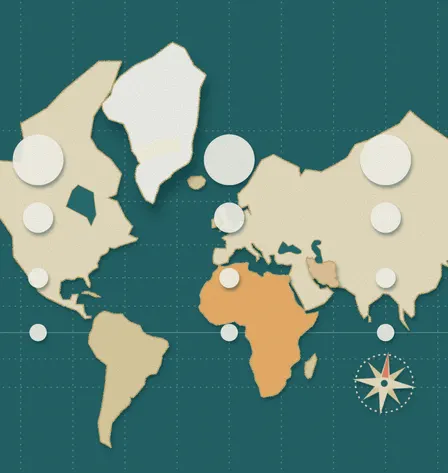
سبک ۳: کلاژ کاغذی
تکههای بریدهشدهی کاغذ با سایه
Command name: /paper-collage. A paper-collage explainer: every shape is cut from coloured paper and laid on a teal paper sheet (#1f5f63): kraft and cream papers with slightly torn edges (a small SVG displacement) and a soft drop shadow, so each piece sits above the sheet; a piece that moves is lifted (a bigger shadow) and held by a strip of semi-transparent tape; a few paper accents (a cut-out compass rose, thread-like dashed lines); a fine paper-fibre texture over everything; the camera pans and zooms across the collage between steps. Light text.
اگه شبیه اون سبک نشد
توی همون چت این جمله رو بفرست. یا دقیق بگو چی کمه، مثلاً «برچسبها بزرگتر» یا «سوژه وسط قاب».
ویژگیهای اصلی این سبک رو پررنگتر کن و برچسبها رو بزرگتر و خواناتر کن.
سؤالهای رایج
کدنویسی بلد باید باشم؟
نه. پرامپت رو کپی میکنی و میفرستی؛ کد رو Claude مینویسه و همونجا توی چت اجراش میکنه.
«دستور» یعنی چی؟
توی Claude Code میتونی یه پرامپت رو توی پوشهی .claude/commands ذخیره کنی و با نوشتن / و اسم فایل اجراش کنی. اسم دستور همون اسم فایله. توی سایت Claude این قابلیت نیست؛ اونجا پرامپت کامل رو بچسبون، نتیجه همونه.
توضیحش از نظر علمی درسته؟
پرامپت از Claude میخواد جواب رو در سه قدم ساده و درست بده و فقط عدد منبعدار بیاره. با این حال هر هوش مصنوعی ممکنه اشتباه کنه، پس نکتههای مهم و مخصوصاً عددها رو خودت چک کن. توضیحهای ریل خودمون رو با منبع چک کردیم.
چرا پرامپتها انگلیسیان؟
چون اسم سبکها، کد رنگها و اصطلاحهای فنی به انگلیسی دقیقترن و Claude باهاشون نتیجهی بهتری میده. سؤالت رو فارسی بنویس؛ متنهای روی ویدیو هم فارسی میشن.
از انیمیشن چطوری ویدیو بگیرم؟
سادهترین راه: انیمیشن رو تمامصفحه کن و با ضبط صفحهی گوشی یا کامپیوتر بگیرش. اگه Claude Code داری، بگو همین انیمیشن رو با Remotion به یه فایل MP4 تبدیل کنه.
ببینید هوش مصنوعی کجا بیشترین صرفهجویی را برایتان دارد.
یک گفتوگوی رایگان درباره کسبوکارتان، و بعد گزارش امکانسنجی مکتوب از فرایندهایتان: زمان و پول کجا هدر میرود، هوش مصنوعی چه کارهایی را میتواند برعهده بگیرد و از کجا باید شروع کرد.