اینها همون سه دستور ریل «Claude طبیعت رو در خطرناکترین حالتش نشونت میده» توی اینستاگرام بلنک پیکسلان. اونجا دماوند رو با اشعهی ایکس دیدی، زلزله رو توی یه برش سهبعدی از زمین، و صاعقهای که به هواپیما میخوره. اینجا پرامپت هر سه رو داری تا موضوع خودت رو سهبعدی ببینی.
روش استفاده
موضوعت رو توی کادر «صحنهی خودت» بنویس، یا یکی از نمونهها رو بزن. فارسی بپرسی، متنهای روی ویدیو هم فارسی میشه.
زیر نگاهی که میخوای، «کپی پرامپت کامل» رو بزن. پرامپت پایه، موضوع تو و اون نگاه با هم کپی میشن.
توی Claude بچسبون و بفرست. Claude یه فایل HTML میسازه که همونجا توی چت (Artifact) پخش میشه.
- برای اینکه توی Claude Code دستور بشه: کادر موضوع رو خالی بذار، پرامپت کامل یه نگاه رو کپی کن و توی پوشهی پروژهات، در فایل .claude/commands/x-ray.md بذار. بعد توی فایل جای [SCENE] بنویس $ARGUMENTS. از اون به بعد کافیه بنویسی /x-ray و موضوعت رو. دو تای دیگه هم همینطور، هر کدوم با اسم خودش.
- سهبعدی سنگینتر از دوبعدیه. اگه روی گوشی کُند پخش شد، توی همون چت بگو «جزئیات مدل رو کمتر کن».
- برای ویدیو، انیمیشن رو تمامصفحه کن و صفحه رو ضبط کن؛ یا توی Claude Code بگو همین رو با Remotion به MP4 تبدیل کنه.
صحنهی خودت
فارسی هم بنویسی Claude میفهمه. خالی بمونه، جاش توی پرامپت [SCENE] میمونه و بعداً پرش میکنی.
یا یکی از اینها:
پرامپت پایه
همهی دکمههای کپی پایین، همین پرامپت رو با صحنهی تو و اون سبک کامل میکنن. اینجا فقط برای اینه که ببینی توش چیه.
Make a short 3D explainer video as ONE self-contained HTML file. Draw the 3D yourself in vanilla JS on an SVG or <canvas> (a small perspective camera, painter's-algorithm depth sorting and simple directional light); no image files. Show it as an artifact so it plays right away.

Subject: [SCENE]

First work out what really happens in three simple, correct steps and one short payoff line. Keep every fact true and modest: never exaggerate the danger (no "about to erupt", "overdue" or "deadly" unless a reliable source says exactly that). Show a number only if it is well known and sourced, and put the source in small type under the payoff. Write every word on screen in the language of the subject.

Frame: 1080×1920 portrait, scaled to fit the window. About 8 seconds, then it loops seamlessly.
Layout (keep it: it is what makes it read on a phone):
- Top: the subject as the title, big (about 68px), with its key word on a solid blue chip (#006fc2, white text); under it, in small type, "simplified, not to scale".
- Middle: the 3D model, big and centred, with real perspective, soft directional light and a slow camera orbit (about 15 to 25 degrees over the whole video).
- Labels: one short label per step (one or two words, at least 44px) on a small white card, with a thin line to the exact part it names. They appear one at a time, about 1.6 seconds apart; the newest card is blue. Never put a label on top of the model: place it in empty space and point.
- Bottom: one caption line at a time (at least 48px), the step's sentence, coming in with its label. The last caption is the payoff, a little bigger, with its key words on the blue chip; the labels leave when it comes.
- Lower third, bottom centre: a small white pill with the command name on the left and "made by Claude" (in the subject's language) on the right, and a thin blue progress line along its bottom edge.
Motion: nothing ever sits still. The model acts out each step as its label appears.

Lens: [STYLE]

Before you finish, check one frame at phone size: can every label be read, is nothing covering the model, and does the 3D read as solid? Fix whatever fails.۳ سبک
تصویر هر نگاه یه فریم از ریل خودمونه. نتیجهی تو با موضوع خودت فرق میکنه و هر بار هم کمی فرق داره.
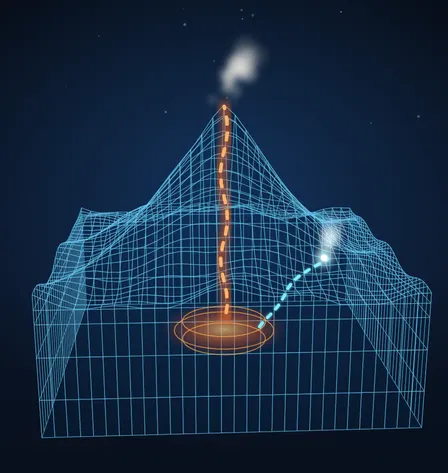
سبک ۱: اشعهی ایکس سهبعدی
از جسم سخت تا درونِ پیدا
Command name: /x-ray. Start with the subject solid and lit for about a second, on a near-black navy background (#070b16) with a few faint stars. Then a glowing cyan scan ring sweeps down through it, and everything it passes turns into an x-ray: dark translucent surfaces with a fine cyan wireframe (#6fd6ff), so the hidden inside shows (channels, chambers, cores, flows) in warm glowing colours: orange #ff6a2b for heat, cyan for water, white for gas. The labels point at the inside parts.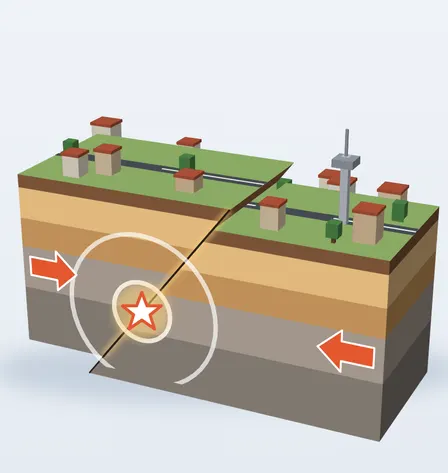
سبک ۲: توضیح سهبعدی
یه برش از زمین، مثل ماکت
Command name: /explain-3d. A clean 3D diorama on a light background (#e9eef4) with a soft shadow under it: the subject as a cut-away block whose front face is a cross-section showing its layers, with a few small things on top for scale (tiny houses, trees, a road). Bright, tidy, slightly toy-like materials. Show the cause, the build-up and the moment it happens as three different motions: arrows that push, shapes that bend, then a sudden snap with waves or a shake.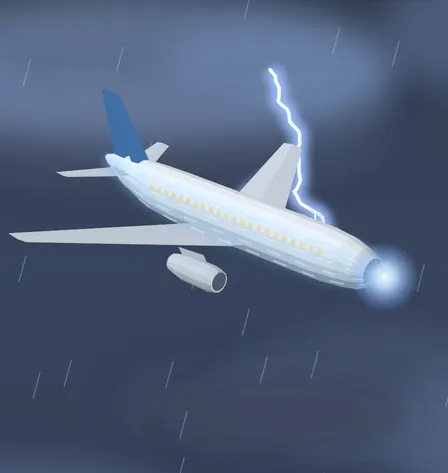
سبک ۳: اگه... چی میشه؟
صحنهی سینمایی، سهبعدی
Command name: /what-if. A cinematic what-if scene: the subject built as a clean low-poly 3D model (white and light grey with one coloured part), seen in a three-quarter hero view from slightly above, in a dark dramatic setting (a navy sky #0a0f1c, storm clouds as soft blurred shapes, rain streaks). The event happens on step one with a bright flash; then show where the energy or the force goes as glowing animated paths over the model, and how it ends. Calm and accurate: show why the outcome is safe or not, without scare tactics.
اگه سهبعدی نشد یا شلوغ شد
توی همون چت این جمله رو بفرست. یا دقیق بگو چی کمه، مثلاً «مدل بزرگتر» یا «دوربین آرومتر».
مدل رو بزرگتر و سهبعدیتر کن، دوربین رو آرومتر بچرخون و برچسبها رو بزرگتر و خواناتر کن.
سؤالهای رایج
کدنویسی بلد باید باشم؟
نه. پرامپت رو کپی میکنی و میفرستی؛ کد و سهبعدی رو Claude مینویسه و همونجا توی چت اجراش میکنه.
«دستور» یعنی چی؟
توی Claude Code میتونی یه پرامپت رو توی پوشهی .claude/commands ذخیره کنی و با نوشتن / و اسم فایل اجراش کنی. اسم دستور همون اسم فایله. توی سایت Claude این قابلیت نیست؛ اونجا پرامپت کامل رو بچسبون، نتیجه همونه.
دماوند واقعاً ممکنه فوران کنه؟
دماوند آتشفشانِ خفتهست، نه خاموش: آخرین فورانش حدود ۷ هزار سال پیش بوده و نزدیک قلهاش هنوز گاز و بخار گوگرد بیرون میاد. ما منبعی پیدا نکردیم که از فوران نزدیکش خبر بده، برای همین توی ریل هم چنین حرفی نزدیم. پرامپت هم از Claude میخواد خطر رو بزرگتر از واقعیت نشون نده.
چرا پرامپتها انگلیسیان؟
چون اصطلاحهای سهبعدی و کد رنگها به انگلیسی دقیقترن و Claude باهاشون نتیجهی بهتری میده. موضوعت رو فارسی بنویس؛ متنهای روی ویدیو هم فارسی میشن.
از انیمیشن چطوری ویدیو بگیرم؟
سادهترین راه: انیمیشن رو تمامصفحه کن و با ضبط صفحهی گوشی یا کامپیوتر بگیرش. اگه Claude Code داری، بگو همین انیمیشن رو با Remotion به یه فایل MP4 تبدیل کنه.
ببینید هوش مصنوعی کجا بیشترین صرفهجویی را برایتان دارد.
یک گفتوگوی رایگان درباره کسبوکارتان، و بعد گزارش امکانسنجی مکتوب از فرایندهایتان: زمان و پول کجا هدر میرود، هوش مصنوعی چه کارهایی را میتواند برعهده بگیرد و از کجا باید شروع کرد.