اینها همون ۱۷ افکت ریل «۱۷ افکت ویدیویی» توی اینستاگرام بلنک پیکسلان. اونجا یه کلیپ از Sam Altman توی مجمع جهانی اقتصاد (داووس ۲۰۲۴) رو دیدی که از ۱۷ افکت رد میشد و همهشون رو Claude با کد ساخته بود. اینجا پرامپت هر افکت رو داری تا روی کلیپ خودت بسازیش.
روش استفاده
Claude Code رو نصب کن. روی مک و لینوکس توی ترمینال بزن curl -fsSL https://claude.ai/install.sh | bash (برای ویندوز و بقیهی راهها: code.claude.com). برای استفادهش اشتراک Claude یا حساب Anthropic Console لازمه.
یه پروژهی Remotion بساز: npx create-video@latest --yes --blank my-video رو بزن، برو توی پوشهی my-video و claude رو اجرا کن. (Node.js باید نصب باشه.)
کلیپت رو با اسم clip.mp4 بذار توی پوشهی public همون پروژه.
توی کادر «صحنهی خودت» بنویس توی کلیپ چی هست، زیر افکتی که میخوای «کپی پرامپت کامل» رو بزن و توی Claude Code بفرست. آخر کار یه دستور میده که باهاش MP4 بگیری.
- افکتهایی که آدم رو از پسزمینه جدا میکنن (مثل «بیرون از قاب»، «پردهی سبز» یا «متن شیشهای») اول برای هر فریم یه ماسک از آدم میسازن. روی مک، Claude Code این کار رو با Vision خود macOS میکنه و چیزی دانلود نمیشه؛ روی ویندوز و لینوکس ابزار متنباز rembg رو نصب میکنه.
- از کلیپی استفاده کن که حقش رو داری: فیلم خودت یا فیلمی با مجوز آزاد. ما برای ریل یه فیلم از Wikimedia Commons با مجوز CC BY 3.0 برداشتیم و اسم سازندهاش رو آوردیم.
صحنهی خودت
فارسی هم بنویسی Claude میفهمه. خالی بمونه، جاش توی پرامپت [SCENE] میمونه و بعداً پرش میکنی.
یا یکی از اینها:
پرامپت پایه
همهی دکمههای کپی پایین، همین پرامپت رو با صحنهی تو و اون سبک کامل میکنن. اینجا فقط برای اینه که ببینی توش چیه.
You are in a Remotion project. Build one video effect on my clip, drawn entirely in code, as its own composition I can render.

My clip: public/clip.mp4. What is in it: [SCENE]

First look at the clip: read its size, frame rate and length (npx remotion ffprobe public/clip.mp4) and pull a few frames to see the framing.

If the effect needs the person on their own (a cut-out), extract the frames (npx remotion ffmpeg works if ffmpeg isn't installed) and make a matte for every frame before anything else:
- On a Mac: a small Swift script with Apple's Vision framework (VNGeneratePersonSegmentationRequest, qualityLevel .accurate, every frame through one VNSequenceRequestHandler), run with xcrun swift.
- On Windows or Linux: the open-source tool rembg (pip install "rembg[cpu]", a portrait or human model).
Average each matte with the frames either side so the edge doesn't flicker, and save the person as transparent WebP frames in public/cut/. If the effect follows the face or the eyes, also save a face track (Vision's VNDetectFaceLandmarksRequest, or MediaPipe) as a smoothed JSON file.

The effect: [STYLE]

How to build it:
- 1080×1920, 30 fps, 45 frames (1.5 seconds) from the start of the clip, unless I ask for another length or moment. The effect must read within the first half second and keep moving until the last frame.
- Show the plain clip with <OffthreadVideo> (or its frames as images) and draw the cut-out from public/cut/ with exactly the same position and scale, so the two line up. If the frame rates differ, map each output frame to the right source frame.
- Draw everything else yourself with React, CSS and SVG: no stock images, no other footage, no logos. Keep any words on screen short and neutral; if they are Persian, load a Persian font (for example @fontsource/vazirmatn) and set them right to left.
- Make it a <Composition id="Effect"> in src/Root.tsx and give me the one command that renders it to out/effect.mp4.

Before you finish, render stills at frames 5, 22 and 40 and look at them: would someone name this effect at a glance on a phone? If not, push its signature further and check again.۱۷ سبک
تصویر هر افکت یه فریم از ریل خودمونه، روی فیلم Sam Altman در مجمع جهانی اقتصاد (World Economic Forum، Wikimedia Commons، CC BY 3.0). نتیجهی تو روی کلیپ خودت ساخته میشه و هر بار کمی فرق داره.
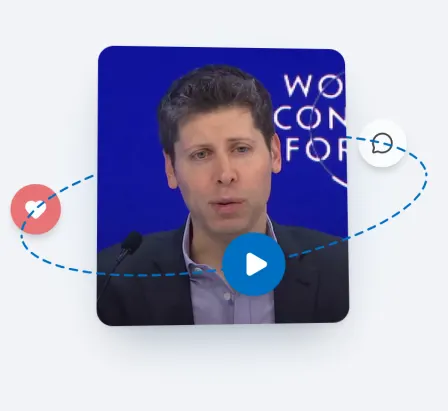
سبک ۱: مدار
کلیپ کوچیک میشه و آیکونها دورش میچرخن
Orbit. The clip starts full frame and springs down (in about 6 frames) into a rounded tile about 55% of the frame wide (30px corners, a soft shadow) with a slight 3D tilt that sways. Around it a dashed ellipse, wide and flat and tilted about 9°, fades in, and three round icon badges (a play button, a heart, a speech bubble; simple filled shapes) travel along it. Split the ring into its far and near halves: the far half and the icons on it pass behind the tile, smaller and dimmer; the near half and its icons pass in front, bigger. The dashes crawl along the ring.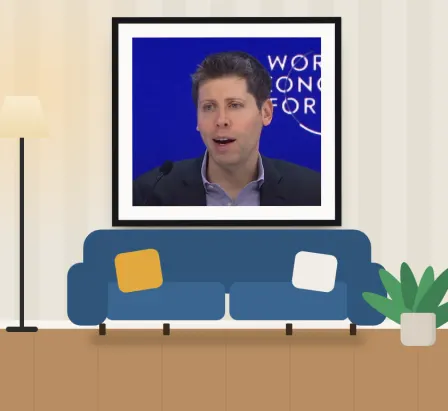
سبک ۲: قاب روی دیوار
کلیپ توی قاب، بالای مبل
Couch wall. The clip hangs on a living-room wall as a framed picture: a thin black frame and a wide white mat. Draw the room in code as a flat illustration: warm off-white striped wallpaper with a soft lamp glow, a white skirting board, a wooden floor, a three-seat sofa with two seat cushions and two throw pillows (one mustard, one white), a floor lamp on one side and a potted plant on the other whose leaves sway. The camera starts close on the picture and dollies sideways and back to the whole room in about 22 frames (ease in-out), with parallax: the sofa and the plant move a little faster than the wall.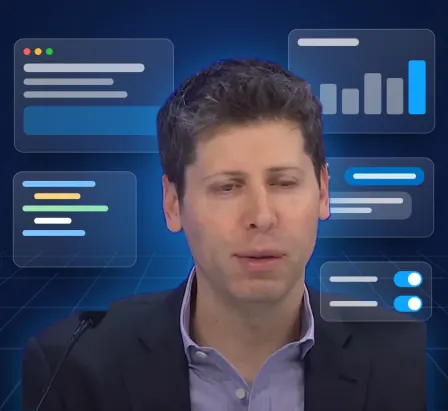
سبک ۳: دنیای اپ
جلوی پنجرههای اپ که از عمق میان
UI world. Stand the cut-out person, big, in front of a dark navy space (a radial gradient and a faint perspective grid floor that scrolls toward the camera). Five translucent glass app panels float around them at different depths: a browser window with three dots and text bars, a bar-chart card, a chat card with two bubbles, a code card with coloured lines, and a card of toggles. The panels fly in from deep behind (scale and fade, one every 3 frames), then bob gently with parallax. One panel sits in front of the shoulder for depth, a toggle switches on in it, and a soft blue glow sits behind the person.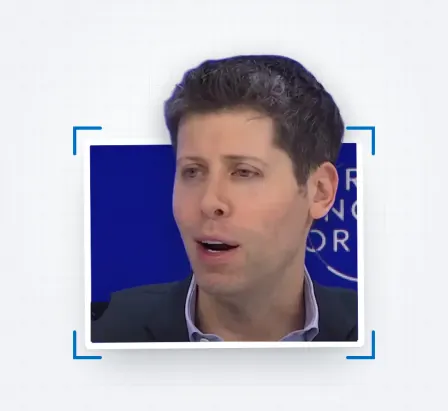
سبک ۴: بیرون از قاب
از توی عکس بیرون میاد
Frame break. The clip sits in a white-bordered photo (about 60% of the frame wide), tilted slightly, on a light grid background. After 7 frames the cut-out person springs up out of it: scale them about 1.5× from the photo's bottom centre and lift them a little, and clip the cut-out to the photo's sides below its top edge but not above it, so the head bursts over the top border while the body stays in the photo. Dim the photo slightly as they come out, add a drop shadow under the cut-out, a few white paper chips flying off the top edge, and four blue corner brackets that pop in around the photo.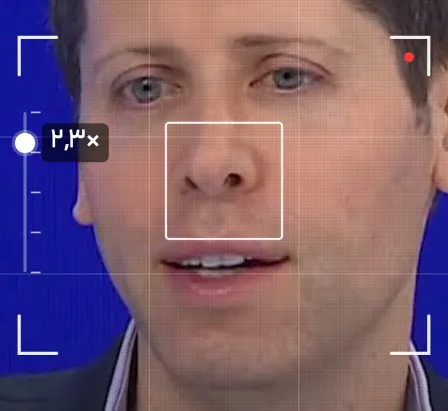
سبک ۵: زوم دیجیتال
منظرهیاب و زوم دومرحلهای
Digital zoom. A camera viewfinder over the clip: four white corner brackets, rule-of-thirds lines, a blinking red record dot, and a zoom rail on one side with a white knob and a readout. The view punches in on the face in two quick snaps (1× to 1.6× at frame 9, to 2.3× at frame 21, each with a small spring overshoot and a moment of focus blur), drifting the face to the centre. A focus square on the face flashes yellow at each step, the readout changes (1.0× → 1.6× → 2.3×), and a faint pixel grid shows past 1.5× so it feels digital.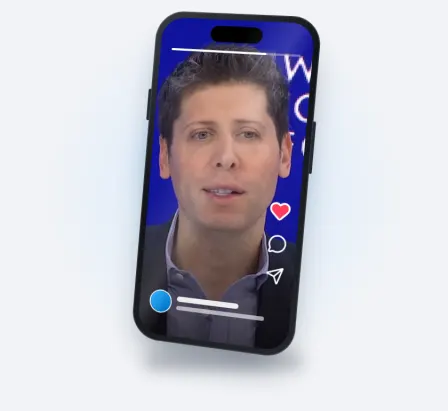
سبک ۶: توی گوشی
کلیپ میشینه توی یه گوشی
Phone mock-up. The clip starts filling the frame and lands, with a soft spring, inside a modern phone (rounded body, thin dark bezel, an island, side buttons, a light glare across the glass) floating over a pale background with a soft blue glow and a floor shadow. The phone turns in 3D (about -18° around the vertical axis, tilted 5°) and keeps swaying. On its screen a short-video app's interface fades in over the clip: a progress bar at the top, heart, comment and share icons down one side (the heart fills red near the end), an avatar and caption bars at the bottom.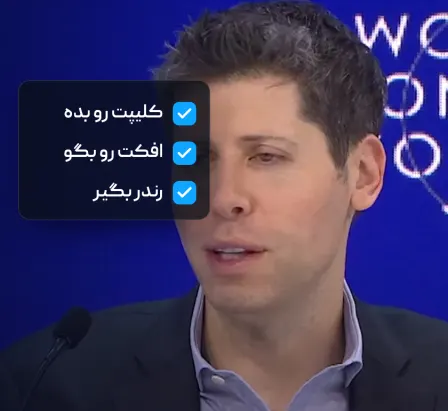
سبک ۷: چکلیست
سه تا کار تیک میخورن
Checklist. The clip plays full frame with a slow push-in, darkened on one side by a gradient. A dark rounded card (glassy, with a thin light border) slides in on that side, and three short rows appear one after another; each row's empty box fills blue and a white tick pops in, one row every 9 frames, the text brightening as it is ticked. Use the three rows I give in the scene; if I gave none, use: "Send the clip", "Name the effect", "Render".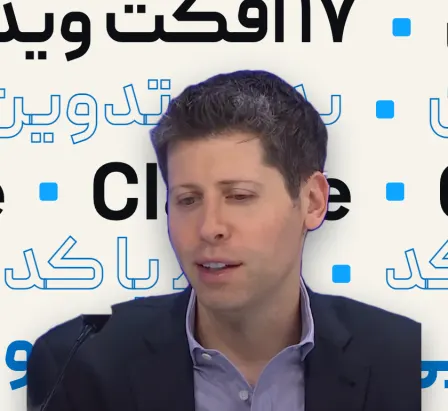
سبک ۸: دیوار تیتر
نوشتههای غولپیکر پشت سرش
Headline wall. Behind the cut-out person, fill the background with five rows of huge bold type (about 140px, rows touching) on an off-white ground. Rows alternate solid black, blue outline and solid blue, slide in from alternating sides with a spring, then keep scrolling sideways in alternating directions at slightly different speeds. Use short, neutral words about the video itself (for example "No editing", "Just code", the topic), separated by small blue squares. The person rises in from below with a soft drop shadow so they sit clearly in front.
سبک ۹: کات با زوم
دوربین میره توی چشمش
Zoom-through cut. The camera dives into one of the person's eyes: zoom from 1× to about 10× over 19 frames, accelerating, while the eye slides to the centre; add a zoom blur (three faint copies at slightly larger scales) and a dark vignette closing in. At the peak, a white flash. Then cut to a moment about 4 seconds later in the clip, framed tighter on the face, coming out of the zoom (about 5.5× down to 1.3×, decelerating over 15 frames) with a small rotation settling to 0° and the blur fading.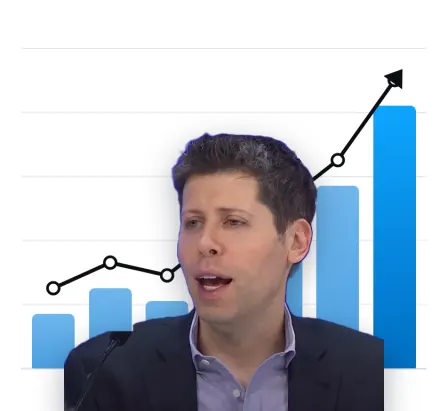
سبک ۱۰: نمودار رشد
ستونها پشت سرش بالا میان
Chart grow. A clean white chart background with horizontal grid lines. Seven bars rise from the axis one after another with a springy ease (the last and tallest in the brightest blue), behind the cut-out person, who stands in front with a soft shadow. A dark line draws itself through points above the bar tops, each point popping in as the line reaches it, and ends in an arrowhead pointing up. No numbers or labels unless I give them.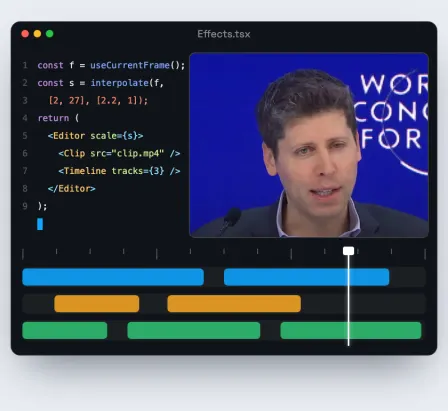
سبک ۱۱: عقبکشیدن دوربین
کلیپ توی یه ادیتور کد بوده
Pull-back reveal. Start with the clip filling the frame, then pull the camera back (ease in-out, about 25 frames) to reveal that it is the preview pane of a dark code-editor window: a title bar with three dots and a file name, a pane of syntax-coloured code lines with a blinking cursor, the clip as the preview, and a timeline underneath with a time ruler, three tracks of coloured clips (blue, amber, green) and a white playhead moving across.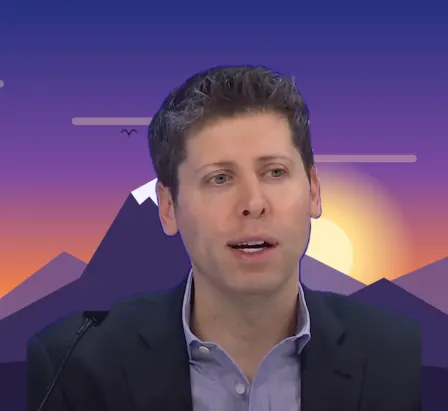
سبک ۱۲: پردهی سبز
سبز پشتش عوض میشه
Green screen. First the cut-out person stands on a bright chroma-green backdrop (a radial gradient, brighter in the middle). After 10 frames a glowing vertical key line sweeps across the frame (ease in-out, about 17 frames) with a few sparks on it; behind the line the green is replaced by a new background drawn in code: a dusk sky (deep blue to violet to orange to gold), a big soft sun, layered mountain silhouettes with one snow-capped peak, drifting cloud streaks and a few birds.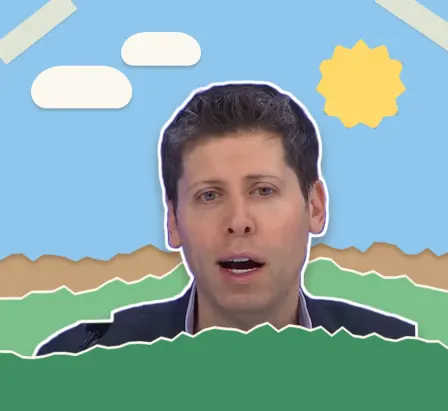
سبک ۱۳: کاغذ بریده
برچسب کاغذی، استاپموشن
Paper cut. Turn the scene into a torn-paper collage on kraft paper with a fine fibre texture: a sky-blue sheet with a torn edge, a cut-paper sun with a zigzag edge, two white paper clouds, and two green hills with torn tops, each with a white torn core along its edge and a small drop shadow. The cut-out person is a sticker between the hills: a thick white outline (four stacked drop-shadows), a paper shadow, tilted about 2°. Animate in stop-motion: everything moves only every 3 frames, with tiny random jitter in position and rotation; the sticker settles from 114% to 100% at the start. Two strips of masking tape on the top corners.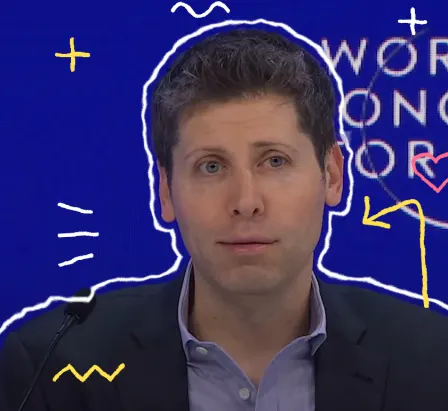
سبک ۱۴: خطخطی
خطهای ماژیکی لرزون دورش
Doodle boil. Over the clip (slightly darkened), add hand-drawn marker doodles that "boil": a white line tracing the person's silhouette about 10px outside it, plus sparkles, motion marks by the cheek, a curved arrow pointing at them, a small heart and a zigzag, in white, yellow and pink. The lines draw themselves on, staggered, in the first 15 frames. Make them boil with an SVG turbulence and displacement filter whose seed changes every 3 frames, so every line wobbles like hand-drawn animation. (For the silhouette line: dilate the matte twice, subtract the smaller from the larger to get a ring, then displace it.)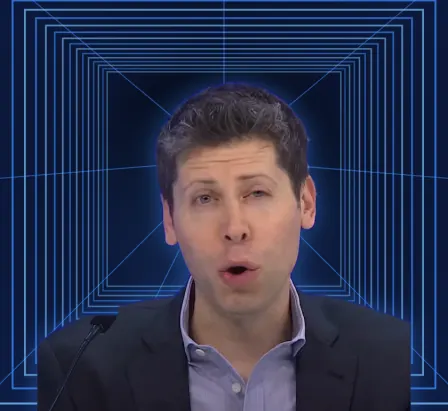
سبک ۱۵: سرگیجه
خودش ثابته، پشتش کش میاد
Vertigo (a dolly zoom). The cut-out person stays exactly the same size and place while the space behind them warps: a glowing blue wireframe corridor of nested rectangles and lines running to a vanishing point, on a dark navy ground. Simulate the dolly zoom: as the camera "moves back" and the lens zooms in to compensate, the corridor flattens and stretches (scale each rectangle by r·D / (r·D + depth), with r easing from 1 to about 6 over the effect), while the rectangles also drift slowly toward the camera. A soft blue rim glow on the person.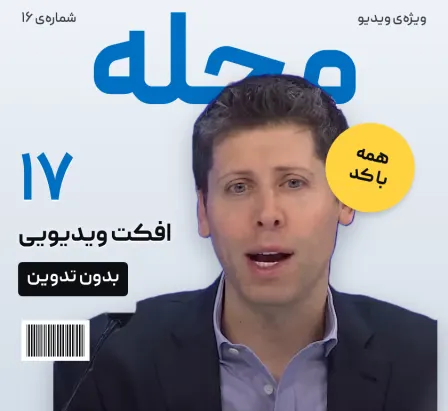
سبک ۱۶: روی جلد
میشه عکس روی جلد یه مجله
Cover story. Make the frame the cover of a magazine: a pale studio background, one huge masthead word at the top in bold blue that drops in (the word I give in the scene; otherwise a neutral word such as MAGAZINE, never a real magazine's name), the cut-out person in front of it so the head overlaps the masthead, cover lines that slide in on the open side (a big number, a short title, a black tag), a round yellow badge that pops in tilted, a small issue line and a barcode. A glossy light sweep passes across the whole cover. All words are neutral and about the video itself, never claims about the person.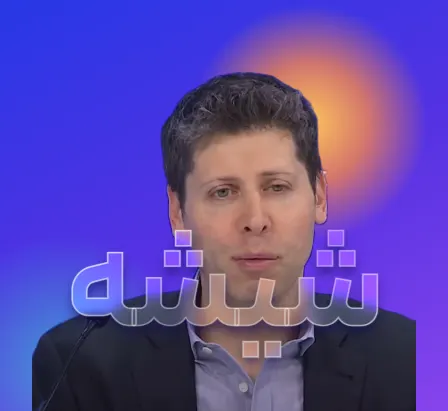
سبک ۱۷: متن شیشهای
یه کلمه از شیشهی مات جلوش
Glass type. Put the cut-out person on a vivid blue-to-violet gradient with a warm orange sun glow drifting behind and a teal glow low on one side. In front of their chest, one huge word made of frosted glass rises in (the word I give in the scene; otherwise one word for the clip's topic): inside the letters show the same scene blurred (about 13px), brighter and more saturated (clip a blurred copy of the scene with an SVG clipPath made of the text); give the letters a thin white edge, a soft shadow under them, and a light streak that sweeps across them.
اگه افکت درست دیده نشد
توی همون گفتوگو با Claude Code این جمله رو بفرست. یا دقیق بگو چی کمه، مثلاً «حلقه بزرگتر» یا «زودتر شروع شه».
ویژگی اصلی این افکت رو پررنگتر کن تا روی گوشی با یه نگاه معلوم باشه، بعد دوباره سه تا فریم نمونه بگیر و نگاه کن.
سؤالهای رایج
کدنویسی بلد باید باشم؟
نه. Claude Code کد رو مینویسه، اگه چیزی لازم باشه نصبش میکنه و دستور گرفتن خروجی رو بهت میده. تو فقط پرامپت رو میفرستی و دستورها رو تأیید میکنی.
با Claude معمولی، توی چت، هم میشه؟
این پرامپتها برای Claude Code نوشته شدن، چون باید فایل ویدیوی تو رو بخونه، ماسک آدم رو بسازه و MP4 بگیره. توی چت، Claude انیمیشن HTML میسازه؛ برای اون، پرامپتهای «۱۰ سبک انیمیشن» رو ببین.
Remotion پولیه؟
برای آدمها، شرکتهای تا سه نفر و سازمانهای غیرانتفاعی رایگانه، حتی برای کار تجاری. شرکتهای بزرگتر مجوز شرکتی لازم دارن (شرطش توی مجوز خود Remotion نوشته شده).
کلیپم آدم نداره (محصول یا منظره)؛ باز هم میشه؟
«مدار»، «قاب روی دیوار»، «توی گوشی»، «چکلیست» و «عقبکشیدن دوربین» روی هر کلیپی کار میکنن. «زوم دیجیتال» و «کات با زوم» روی صورت زوم میکنن؛ اگه صورتی نیست، توی صحنه بنویس کجا زوم کنه. بقیه سوژه رو از پسزمینه جدا میکنن؛ برای یه شیء بگو به جای ماسک آدم، پسزمینهی خود شیء رو با rembg برداره.
چرا پرامپتها انگلیسیان؟
چون اسم افکتها و اصطلاحهای فنی به انگلیسی دقیقترن و Claude باهاشون نتیجهی بهتری میده. صحنه رو هر زبونی بنویسی، Claude میفهمه.
میتونم چند تا افکت رو پشت هم بذارم، مثل ریل؟
آره. هر افکت رو جدا بساز، بعد به Claude Code بگو «این افکتها رو پشت هم بذار، هر کدوم یک و نیم ثانیه، با کات و اسم هر افکت پایین تصویر». ریل ما هم همینطوری ساخته شده.
ببینید هوش مصنوعی کجا بیشترین صرفهجویی را برایتان دارد.
یک گفتوگوی رایگان درباره کسبوکارتان، و بعد گزارش امکانسنجی مکتوب از فرایندهایتان: زمان و پول کجا هدر میرود، هوش مصنوعی چه کارهایی را میتواند برعهده بگیرد و از کجا باید شروع کرد.